
I bought a generic IoT camera to see if I could break into it. I hooked up my Raspberry Pi to the camera’s UART interface (TX, RX, and GND) and fired up Minicom, hoping to catch a glimpse of the device’s boot process.
At first, it was all chaos! A wall of scrolling “noise” and garbage text that made the terminal almost unusable but hidden inside that endlessly scrolling text were also the keys to the shutting it. I noticed that the chip kept frantically trying to connect to a hardcoded WiFi network, broadcasting the SSID and also the password in plain text !!
I also grabbed the vital stats:
- Chip: Beken BK7252N
- OS: RT-Thread OS v3.1.0
- Kernel Address:
0x10000
The Honeypot & The Fake Shell#
To shut up the log spam so I could actually type, I set up a mobile hotspot using the stolen credentials the camera was screaming for(SSID & PASSWORD). Instantly, the camera connected, the noise died down, and I was dropped into a clean shell prompt: msh />.
I hit TAB to get the command list and saw promising tools like t_readFlashAddr, w_r16d8Read (a direct register reader?), and rfcali_show_data.
[I/FAL] Fal(V0.4.0)success
[I/OTA] RT-Thread OTA package(V0.2.4) initialize success.
go os_addr(0x10000)..........

 \ | /
- RT -     Thread Operating System
 / | \     3.1.0 build Aug 10 2024
 2006 - 2018 Copyright by rt-thread team

[FUNC]rwnxl_init
[FUNC]calibration_main
xtal in flash is:30
lwIP-2.0.2 initialized!

codeBuildTime:2024年 08月 10日 星期六 17:35:47 CST
com.naxclow.Camera_v0-1.1.20
DevType (NAXC_2M_48P_B_A9_versimsh />[0]202408101735

# --- CREDENTIAL LEAK ---
_wifi_easyjoin: ssid:NAXCLOW bssid:00:00:00:00:00:00 key:34974033A
# ----------------------------------------

rtc_videoMalloc 0x905768
normal_connect11
wpa_supplicant_req_scan
PSKC: ssid NAXCLOW
wpa_supplicant_connect
wpa_driver_associate

# --- WIFI CONNECTED ---
[WLAN_MGNT]wlan sta connected event callback
sta_ip_start
configuring interface mlan (with DHCP client)
IP UP: 172.20.10.11

# --- ROOT SHELL ACCESS ---
msh />
msh /> help
msh: help: command not found
msh />
RT-Thread shell commands:
rxsens           - do_rx_sens
txevm            - do_tx_evm
rfcali_show_data - rfcali show data
t_readDevice     - t_readDevice....
t_readMACAddr    - t_readMACAddr....
t_readFlashAddr  - t_readFlashAddr
reboot           - asdsadsad
w_r16d8Read      - w_r16d8Read
w_r16d8Write     - w_r16d8Write
msh />
msh />
Deception
For a second I thought I won, I found my way into the firmware and it was easy and striaghtforward! BUT the engineers had “lobotomized” the shell; the commands were there, but the underlying code was stubbed out or restricted to reading the wrong hardware buses. So I zwas inside, but there wasn’t anything I could really do.
The Hardware Wall#
I briefly considered a hardware brute-force attack using a CH341A programmer to clip onto the flash chip and dump the firmware physically but a deep dive into the BK7252N datasheet revealed that this chip is a SiP (System in Package).
The flash memory isn’t a separate chip I can clip onto, it’s directly inside the processor silicon itself. The hardware door was welded shut, and the OS shell was a dead end. That left only one path forward: exploiting the bootloader protocol before the OS even loads.
The Pivot: Targetting the Bootloader#
After a quick Google search, I was introduced to bk7231tools, a custom Python utility designed to exploit the serial protocol of Beken chips.
The theory was simple: The chip listens for a specific “handshake” byte sequence for milliseconds when it first wakes up and If it hears it, it pauses the boot process and enters a raw data transfer mode. If it misses it, it boots the OS and ignores me.
The execution was a test of reflexes. I had to issue the read_flash command on the Pi and physically plug in the camera’s power after waiting a bit for the command. I think I was supposed to see a Waiting for link ... pro, but that never happen, the tool kept stopping after a few seconds and so I had to wing and hope it works.
el-mokh@raspberrypi:~$ bk7231tools read_flash -d /dev/serial0 firmware_2M_backup.bin --length 2097152 --baudrate 115200It took multiple attempts. Finally, text started scrolling. I was pulling data at 115200 baud, sucking the memory out byte by byte. Unfortunately, in my excitement and repeated handling of the board, I put too much tension on the wiring.
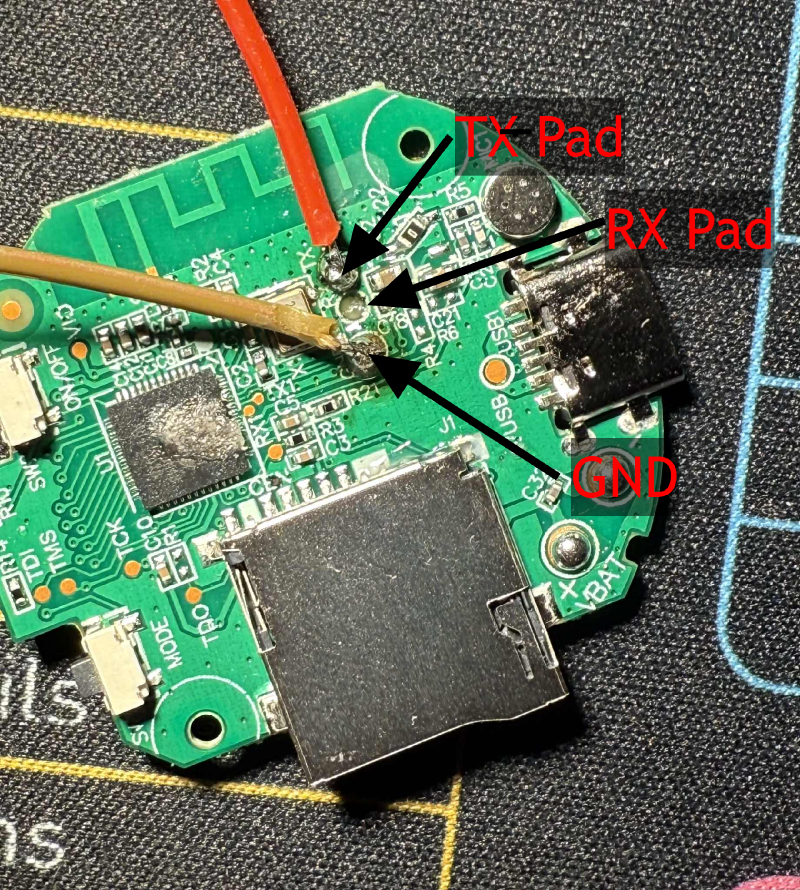
I ripped a solder pad right off the PCB BUT I had the prize: a 2MB binary file named firmware_2M_backup.bin.
The Loot#
First I tried running dissect_dump, a command offered by the tool, but it gave me bad news. The file i got was corrupted ! And i couldn’t retrieve another one because the pad had already been ripped. I ran binwalk on it anyways but it failes. Why ? Because Beken chips don’t use SquashFS, they use a custom Layout.
So I performed a digital autopsy using strings and grep, ignoring the file system structure and hunting for raw text patterns. That’s when I found the smoking gun. The firmware wasn’t just sloppy; it was a security nightmare.
Here is what I found inside the dump:
1. The Hardcoded Backdoor
I found credentials hardcoded near a function labeled QC_fileConfigTesting. The “honeypot” I created earlier wasn’t a fluke; it was a factory test mode the developers forgot to disable.
SSID: NAXCLOW
PASS: 34974033A
2. The Cloud Identity
Buried in the binary was the device’s unique “Soul”: the Cloud Authentication Token and Device ID (Redacted for security).
Device ID: 0800d1099...... [REDACTED]
Token:     qefc90031649913745bc02df69...... [REDACTED]
3. The Spyware Endpoints
I mapped out the API endpoints showing exactly how the camera uploads motion alerts and video feeds to a server farm in China.
Endpoint: v720.naxclow.com
API:/app/api/ApiAlertRecord # And different other ones