
TLDR#
- Got a root shell on a camera I bought from action by firmware modding.
- Discovered a hardcoded Backdoor, can inject code by inserting an SD card with a specific file name
Network Analysis#
Started by checking the outbound packets looking for any clear HTTP or unencrypted UDP but no luck, it was encrypted .
Aftet that, I tried using mitmproxy, hoping maybe the camera wasn’t checking the certs it was getting, but yet again, no luck, it was authenticating them so i wasn’t able to pick up anything.
Hardware Hacking#
I tried connecting to UART, but I was prompted for a login and password, which I didn’t have, but a few things caught my eye when connecting to UART,
- U-Boot 2019.10.0-V4.0.27
- Hit any key to stop autoboot
- and something about a script called start.sh
I started by trying to interrupt the bootloader, but it just kept resetting !
U-Boot 2019.10.0-V4.0.27 (Jun 02 2026 - 17:21:06 +0800)

CPU: 960MHz
Model: EVB_CBD_AK3918AV130_YY_V1.0.0  board
DRAM:  64 MiB
ak_fixed_clk_probe: parameters ok, nf=100 nr=1 nb=16 freq=400000000
ak_fixed_clk_probe pll2 has inited!
pll2 frequency out: 400MHz
gclk frequency out: 200MHz
Flash: SF: Detected XM25QH64D with page size 256 Bytes, erase size 4 KiB, total 8 MiB
8 MiB
MMC:   @get_card_status, card UNPLUGED
mmc1@20108000: 0
Loading Environment from SPI Flash... OK
In:    uart0@20130000
Out:   uart0@20130000
Err:   uart0@20130000
Net:   No ethernet found.
Hit any key to stop autoboot:  0
SF: Detected XM25QH64D with page size 256 Bytes, erase size 4 KiB, total 8 MiB
SF: Detected XM25QH64D with page size 256 Bytes, erase size 4 KiB, total 8 MiB
nvram_flash_read_zbuf: offs: 0x0, len: 65536
ASUS NVRAM, v0.08. Available space: 65536. Integrity: OK
uboot_enter : , read_flag : 0
### Warning:current uboot shell is unavailable ###
resetting ...
NbAak_fixed_clk_probe: parameters ok, nf=100 nr=1 nb=16 freq=400000000
pll2 frequency out: 400MHz
gclk frequency out: 200MHz


U-Boot 2019.10.0-V4.0.27 (Jun 02 2026 - 17:21:06 +0800)

CPU: 960MHz
Model: EVB_CBD_AK3918AV130_YY_V1.0.0  board
DRAM:  64 MiB
ak_fixed_clk_probe: parameters ok, nf
I also something about a watchdog, so I went researching what that was. And after a long afternoon, I went down a rabbit-hole to try to disable the watchdog to let me enter the UBOOT shell. I Never really succeeded in doing that and I’m pretty sure the problem isn’t the watchdog but the shell is disable because of this line ### Warning:current uboot shell is unavailable ### .
Saying anyway and moving on, I dumped the firmware and did some static analysis.
if [ ! -z ${start_sh_value} ]; then
        ${start_sh_value} &
    fi
    ;;
debug_ini="/mnt/sdcard/yy_debug.ini"

mode=$(get_ini_value "${debug_ini}" "mode" "normal")
start_sh=$(get_ini_value "${debug_ini}" "start_sh" "")

execute_action_by_mode "${mode}" "${start_sh}"
The devs left a backdoor!! So I got an SD card, wrote a couple of scripts and voila :
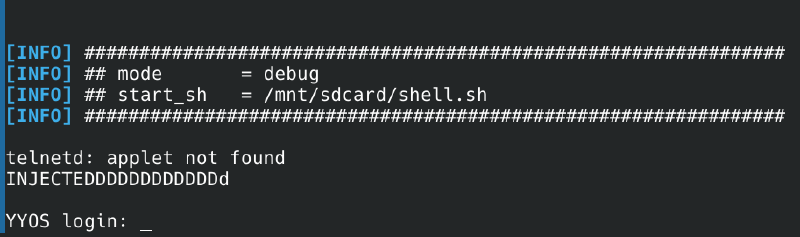
A bit a fiddeling later with the injection potential, I got tired of removing the SD card, editing the script and putting it back in again. I tried looking for a way to bypass the login prompt. So i got into reading again, this time tho, I know the OS is running BusyBox because of the applet not found error.
And apparently what makes me land in the login prompt is a part in a file called inittab in the etc directory. I tried changing it from the command injection but it’s a read only FS so it didn’t work.
so back to the fw image i had, some fw modding using mksquashfs to create the the squashfs FS after editing it and dd to patch it in the full fw image at the specific byte offset
mksquashfs extractions/fw2.bin.extracted/1C0000/squashfs-root/ new_rootfs.sqfs -comp xz -b 131072 -noappend -always-use-fragments
dd if=new_rootfs.sqfs of=modded-fw.bin bs=1 seek=1835008 conv=notrunc
specifically changed ttySAK0::respawn:/sbin/getty -L ttySAK0 115200 vt100 to ttySAK0::respawn:/bin/sh in the /etc/inittab file. FLashing the new fw image and boom
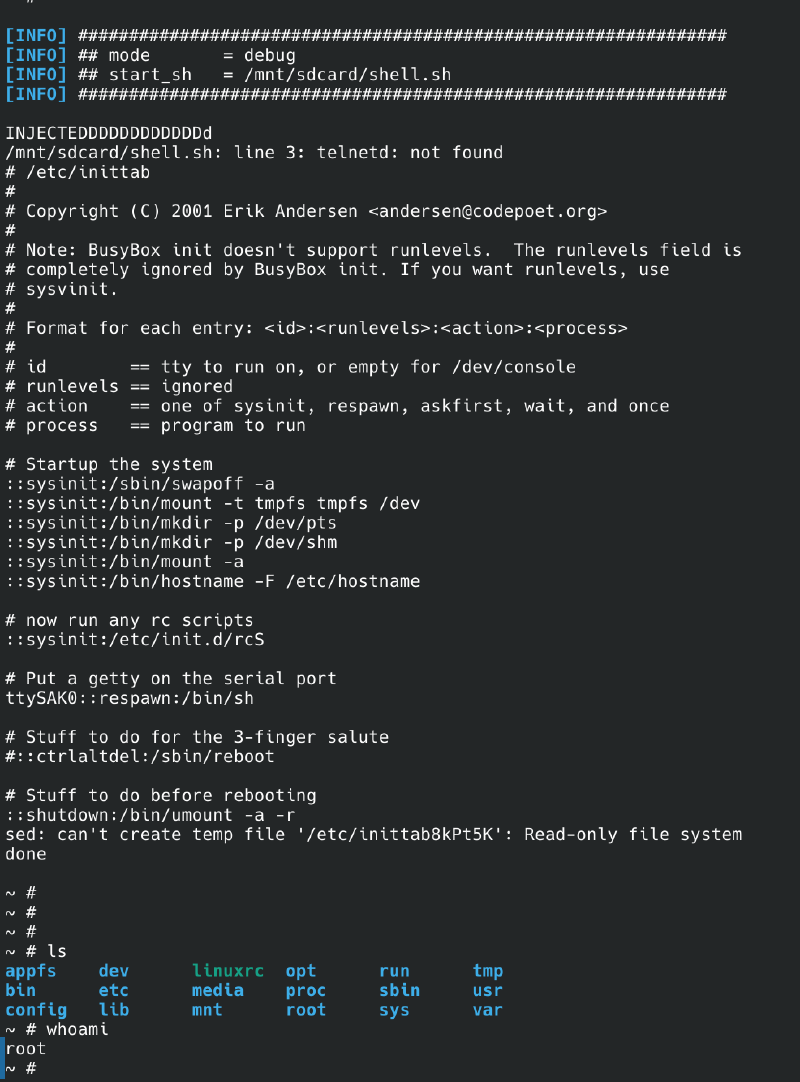
Root shell acquired, what next ?
Well I did some more recon from inside the camera. Checked the server the camera was talking to, its hosted on amazonaws infrastruture ec2-18-184-224-184.eu-central-1.compute.amazonaws.com and talking to port 8886.
did more recon but I think it should be for another part to go more into the MQTT service and how the talking happens between the camera and the server.